
Showing posts with label app-inventor. Show all posts
Showing posts with label app-inventor. Show all posts
Tuesday, January 18, 2011
Quiet Time
Built a small app today, using Google App Inventor for Android, as a gift of Quiet Time for a friend. When he receives a text, this app replies with a standard or custom message. Go ahead. Give it a try. The entire code and UI is posted here.

Friday, January 14, 2011
A Dice Rolling App Using The Accelerometer Sensor Component of App Inventor
I wrote a dice rolling app using the Accelerometer Sensor component of Google App Inventor, the UI based mobile app creation tool from Google.
This is what the app does. When you shake the phone, the phone vibrates and starts rolling a die. When the vibration stops, the die stops rolling and you get a result from 1 to 6. The result depends on a random number generator and the duration of the shake. So you get an unpredictable result as you would in the real world. Here is the code for the app.
This is a simple app to understand the basic functionality of the Accelerometer component in a phone.
The User Interface
What I like about this app is that it has no buttons on screen. The only way to interact with the app is by shaking the phone. I can imaging a two year old child shaking the phone, feeling the phone vibrate, seeing the dice roll and having a lot of fun with the app. Of course, the Android phone will be a $150 toy.
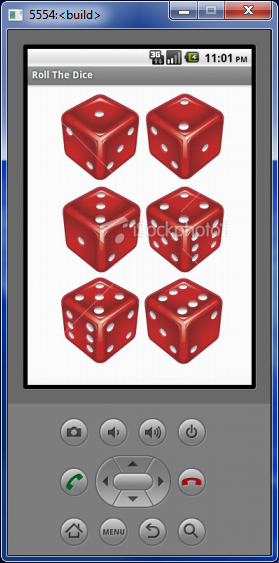

This is what the app does. When you shake the phone, the phone vibrates and starts rolling a die. When the vibration stops, the die stops rolling and you get a result from 1 to 6. The result depends on a random number generator and the duration of the shake. So you get an unpredictable result as you would in the real world. Here is the code for the app.
This is a simple app to understand the basic functionality of the Accelerometer component in a phone.
The User Interface
What I like about this app is that it has no buttons on screen. The only way to interact with the app is by shaking the phone. I can imaging a two year old child shaking the phone, feeling the phone vibrate, seeing the dice roll and having a lot of fun with the app. Of course, the Android phone will be a $150 toy.

Thursday, January 13, 2011
Coin Toss App Using Google App Inventor
I built a is a simple Android mobile app, using Google App Inventor. Using the app you can flip a coin, when you dont have a coin handy and need to make random decision.
App Inventor is a UI based tool to create mobile apps for the Android phone. It is a good tool for product managers and product designers to build functioning mobile app prototypes.
I have posted the code below. As you can see, the logic of this app is easy to follow and is clear to people who do not program for a living. Give it a try. It is a lot of fun.
Using similar logic you can write a "Roll The Dice" app. A great way to teach probability to kids. I wish I had apps like these when I was learning probability and statistics in school. Would have been a lot more interesting.


App Inventor is a UI based tool to create mobile apps for the Android phone. It is a good tool for product managers and product designers to build functioning mobile app prototypes.
I have posted the code below. As you can see, the logic of this app is easy to follow and is clear to people who do not program for a living. Give it a try. It is a lot of fun.
Using similar logic you can write a "Roll The Dice" app. A great way to teach probability to kids. I wish I had apps like these when I was learning probability and statistics in school. Would have been a lot more interesting.

Saturday, January 08, 2011
Understanding Gaming By Catching Fruits
I created a simple game today using Google App Inventor to understand the basics of game design and game programming. A demo of the app I built and the code are below.
If you would like to see the step by step process of building the original tutorial, please go to http://appinventor.googlelabs.com/learn/tutorials/molemash/molemash.html

If you would like to see the step by step process of building the original tutorial, please go to http://appinventor.googlelabs.com/learn/tutorials/molemash/molemash.html

Thursday, January 06, 2011
A Barcode Scanner Android Mobile Application Using Google App Inventor
I wrote an application today called Book Barcode Scanner. Using the app you can scan the barcode of a book, get the ISBN number and search for the book details such as price on the web. Here is the video and the complete code for the app.


Over the past few months I got many emails asking me for the source code.
You can buy the source code now.
The video and the code above will show you how to build the prototype. But if you want the source file, click here to buy it for $0.99. I spend a few hours exploring it and building it. It might save you an hour or so.
You will get a zip file. Go to your appinventor instance and upload the zip file to create a new project.

Tuesday, January 04, 2011
A Camera App Using Google App Inventor
I built a Camera app using Google App Inventor today. In the video below I demo the app and explain how it was built step by step. I have also posted the entire App Inventor code required to build this camera app below.


Wednesday, December 29, 2010
Storing Data In The Google Cloud With Google App Inventor
Two product management colleagues from the US and a product manager friend from India reached out to me and said that they are very curious about Google App Inventor. One of my colleagues who is from the SAP Mobile Product Management team wanted to know how user preference data can be stored on the cloud and retrieved when a person uses another app.
For example, a person can say that he prefers a green background when he is using one app and another app can pick up that preference and set the background of the second app green. This feature lets multiple apps or multiple people access the same data stored in the cloud. This is a very powerful feature. Data is stored in the Google cloud.
This is very straight forward to do in Google App Inventor. I created an app where the user choose the background color for the app. The app stores the data in the Google cloud. When the user restarts the app, it retrieves the data from the cloud and uses that information to set the background color.
Here is a video demonstrating the concept using two mobile apps.
Here is the complete code for the mobile application, i built to explore this feature.

For example, a person can say that he prefers a green background when he is using one app and another app can pick up that preference and set the background of the second app green. This feature lets multiple apps or multiple people access the same data stored in the cloud. This is a very powerful feature. Data is stored in the Google cloud.
This is very straight forward to do in Google App Inventor. I created an app where the user choose the background color for the app. The app stores the data in the Google cloud. When the user restarts the app, it retrieves the data from the cloud and uses that information to set the background color.
Here is a video demonstrating the concept using two mobile apps.
Here is the complete code for the mobile application, i built to explore this feature.

Tuesday, December 28, 2010
The Baby Does Not Like Me
I have been creating a series of apps to explore Google App Inventor, to persuade product managers to prototype and to urge product designers to think mobile first.
Today, I wrote a mobile app called "The baby does not like me" to explore and demonstrate the orientation sensor capabilities of a mobile device. I created the app using Google App Inventor, using which you can create mobile apps for an Android device without writing any code.
In the video below I demonstrate the rudimentary app that I wrote to explore the Orientation Sensor functionality of a mobile device. The code I assembled to make this app is provided below the video.

Today, I wrote a mobile app called "The baby does not like me" to explore and demonstrate the orientation sensor capabilities of a mobile device. I created the app using Google App Inventor, using which you can create mobile apps for an Android device without writing any code.
In the video below I demonstrate the rudimentary app that I wrote to explore the Orientation Sensor functionality of a mobile device. The code I assembled to make this app is provided below the video.

Using The Orientation Sensor To Think Mobile First
I wrote a simple app today, using Google App Inventor, to explore the power of the orientation sensor in a mobile phone. Using the orientation sensor, we can find out the how a use is holding the phone. It is possible to find out if the user if holding it vertically or horizontally. Since we know the orientation, it is possible to display appropriate functionality or appropriate user interface for that particular orientation.
This is remarkable, because this is something we don't think of when building apps for the browser. So when we design mobile apps, let us not just shrink the browser apps for a small screen. Let's think mobile first when designing applications so that we can take advantage of the numerous possibilities offered by a mobile device.
In the video below, I demonstrate the app, talk about why i wrote it, and share the code for the app.
This is remarkable, because this is something we don't think of when building apps for the browser. So when we design mobile apps, let us not just shrink the browser apps for a small screen. Let's think mobile first when designing applications so that we can take advantage of the numerous possibilities offered by a mobile device.
In the video below, I demonstrate the app, talk about why i wrote it, and share the code for the app.
 |
| Logic For Orientation Sensing |
Monday, December 27, 2010
An App To Find South Indian Eating Places In The San Francisco South Bay Area
First, I believe that mobile applications are going to trigger a long tail of enterprise software applications. We will soon have mobile applications that are meant for a few people for just a few days.
Second, I believe that 'making to think' i.e., prototyping is the most effective way to design and build products. It is also the best way to convey design intent to the development teams and the best way to verify the value a product brings for customers.
I tried out Google App Inventor for a few months and strongly believe that it will help product managers and products designers understand the possibilities and opportunities thrown open by a mobile device. I also believe that it will help them convey their ideas more effectively to product development colleagues.
I am trying to convince my product management colleagues to give Google App Inventor, a simple Android mobile application creation tool, a try. So I created a simple mobile application that lists a few South Indian restaurants and connects to Google maps to give you directions to the restaurant you pick, from your current location.
Clearly, the app makes sense only for a few thousand people in the world. That is fine because the cost and effort required to build apps makes it possible to build for just a few thousand or even a few hundred people.
In the video below, I show the application and also give a brief explanation of how I built it using Google App Inventor. I hope this post will make you curious about the possibilities of prototyping and the future of enterprise mobile applications.
of enterprise software applications. We will soon have mobile applications that are meant for a few people for just a few days.Second, I believe that 'making to think' i.e., prototyping is the most effective way to design and build products. It is also the best way to convey design intent to the development teams and the best way to verify the value a product brings for customers.
I tried out Google App Inventor for a few months and strongly believe that it will help product managers and products designers understand the possibilities and opportunities thrown open by a mobile device. I also believe that it will help them convey their ideas more effectively to product development colleagues.
I am trying to convince my product management colleagues to give Google App Inventor, a simple Android mobile application creation tool, a try. So I created a simple mobile application that lists a few South Indian restaurants and connects to Google maps to give you directions to the restaurant you pick, from your current location.
Clearly, the app makes sense only for a few thousand people in the world. That is fine because the cost and effort required to build apps makes it possible to build for just a few thousand or even a few hundred people.
In the video below, I show the application and also give a brief explanation of how I built it using Google App Inventor. I hope this post will make you curious about the possibilities of prototyping and the future of enterprise mobile applications.
 |
| All the logic you need to build the "Let's Go South Indian Today" app. |
Sunday, December 26, 2010
A Google App Inventor App That Auto Responds To Text Messages
I created a prototype mobile app that auto responds to text messages using Google App Inventor
This app, when launched, will listen to text messages and respond to the message saying you are busy and will message back later.
This app, when launched, will listen to text messages and respond to the message saying you are busy and will message back later.
 |
| All the logic you need for a Text auto responder app for Android |
Saturday, December 25, 2010
Storing Data In A Mobile Database Using Google App Inventor
I wrote a simple App Inventor application today to understand how App Inventor stores data in a mobile database stored right inside your Android phone. I followed the tutorial available from www.androidandme.com to create the app.
Storing data across sessions is useful for creating compelling mobile prototypes. Product managers and product designers can create prototypes to test the concept, features and even user experience.
The app below is called "Did I Leave The Oven On?". A user can switch On or switch Off the oven and the app will store the status, when the user returns. The entire App Inventor Logic and a video, from www.androidandme.com are posted below.
I hope you find this useful. Happy prototyping.

Google App Inventor - User Experience from clarklab on Vimeo.
Storing data across sessions is useful for creating compelling mobile prototypes. Product managers and product designers can create prototypes to test the concept, features and even user experience.
The app below is called "Did I Leave The Oven On?". A user can switch On or switch Off the oven and the app will store the status, when the user returns. The entire App Inventor Logic and a video, from www.androidandme.com are posted below.
I hope you find this useful. Happy prototyping.

 |
| All the logic you need to understand how data is stored in a database by App Inventor |
Google App Inventor - User Experience from clarklab on Vimeo.
Google App Inventor - Logic For An App That Switches Screens
I wrote a simple program in Google App Inventor for Android to switch screens. You might be wondering why such a simple thing is worth mentioning. This is why.
I am exploring Google App Inventor for Android as a mobile prototyping tools for Product Managers, who do want to or cannot program to create a mobile app. To enable product managers create simple mobile applications, it is important to know how to switch from screen to screen, even though App Inventor has only one screen.
For example, if your mobile app has a total of 5 screens, you hide all the screens but the first screen. Then, you can show the screen you want to show and hide all the other screens.
The interesting this is that you will be creating real mobile applications that will function in a real Android device. That is a lot of fun.
Here are the screen shots of the app and all the logic required to make this happen. The Sunrise picture shows up when the app launches. When the user touches the Go To Sunset button, the users is taken to the Sunset screen. When the user touches the Back To Sunrise button, the users is taken back to the Sunrise screen.
Do not be fooled by the simplicity of the code. You can even create sophisticated apps such as a twitter client using Google App Inventor for Android.
At the bottom, I have also added a video from Jason Tyler, showing how to build the app in App Inventor.
I am exploring Google App Inventor for Android as a mobile prototyping tools for Product Managers, who do want to or cannot program to create a mobile app. To enable product managers create simple mobile applications, it is important to know how to switch from screen to screen, even though App Inventor has only one screen.
For example, if your mobile app has a total of 5 screens, you hide all the screens but the first screen. Then, you can show the screen you want to show and hide all the other screens.
The interesting this is that you will be creating real mobile applications that will function in a real Android device. That is a lot of fun.
Here are the screen shots of the app and all the logic required to make this happen. The Sunrise picture shows up when the app launches. When the user touches the Go To Sunset button, the users is taken to the Sunset screen. When the user touches the Back To Sunrise button, the users is taken back to the Sunrise screen.
Do not be fooled by the simplicity of the code. You can even create sophisticated apps such as a twitter client using Google App Inventor for Android.
At the bottom, I have also added a video from Jason Tyler, showing how to build the app in App Inventor.
 |
| A simple app that changes screens when you click a button |
 |
| All the logic you need to change screens |
Sunday, December 05, 2010
Google App Inventor - A Simple Twitter Client
Google App Inventor is a visual tool to develop simple mobile apps without writing any code.
Today I wrote a very rudimentary twitter client for the Android phone using Google App Inventor. My app enables anyone with a twitter account to authenticate themselves and tweet. It was an interesting exercise to register the app with Twitter first, get the necessary Consumer Key and Consumer Secret codes and connect to twitter from the mobile app.
This may not sound like a big deal for my development colleagues. But it is a big deal for me, because I am not a mobile developer and have never written code for a living. I am a product manager with a product design background, who makes prototypes to understand the market and people.
You may be hesitating to start making mobile apps of your own, thinking that you are a product manager or product marketer with an MBA and limited technical skills. I assure you. You can do it even if you have an MBA. I have one and I was able to do it.
Today I wrote a very rudimentary twitter client for the Android phone using Google App Inventor. My app enables anyone with a twitter account to authenticate themselves and tweet. It was an interesting exercise to register the app with Twitter first, get the necessary Consumer Key and Consumer Secret codes and connect to twitter from the mobile app.
This may not sound like a big deal for my development colleagues. But it is a big deal for me, because I am not a mobile developer and have never written code for a living. I am a product manager with a product design background, who makes prototypes to understand the market and people.
You may be hesitating to start making mobile apps of your own, thinking that you are a product manager or product marketer with an MBA and limited technical skills. I assure you. You can do it even if you have an MBA. I have one and I was able to do it.
I am convinced that Google App Inventor can be a useful tool for product managers and product designers who like making things. To convince you that it is easy to write app inventor applications, I have posted the logic of the twitter client I wrote here.
 |
| All the logic you need for a simple twitter client |
Sunday, November 28, 2010
A Paint Program Using Google App Inventor
I created a simple paint program for Android using the Google App Inventor tool. I did not design the app. I just created it based on the tutorial. Even the act of recreating the app, as it was described, gave me a lot of insight into how the basic interactions of Touch and Slide are handled by the mobile operating systems.
I have developed E-Learning content for the web in the past. But I have not, written a paint program before. It was fun to explore the basics of designing a paint program for mobile devices.
I can already think of many simple fun and useful app ideas using the paint basics of Android. If you enjoy designing software, give Google App Inventor a try. It helps you make to think.
I believe that anyone who can think logically can use Google App Inventor to build very simple prototypes to visualize an application. That includes product managers and product designers. Google App Inventor provides you with a a drag and drop interface to build simple yet powerful apps. It does take some perseverance. But it is doable. The logic for the paint program I created based on the App Inventor tutorial is below.
It is all drag and drop. I did not write any code.
 |
| Paint Program |
I can already think of many simple fun and useful app ideas using the paint basics of Android. If you enjoy designing software, give Google App Inventor a try. It helps you make to think.
I believe that anyone who can think logically can use Google App Inventor to build very simple prototypes to visualize an application. That includes product managers and product designers. Google App Inventor provides you with a a drag and drop interface to build simple yet powerful apps. It does take some perseverance. But it is doable. The logic for the paint program I created based on the App Inventor tutorial is below.
It is all drag and drop. I did not write any code.
 |
| Google App Inventor Visual App Development Tool |
Saturday, November 20, 2010
Thinking Mobile First with App Inventor
As a proponent of the Make-To-Think and the Thinking-Mobile-First philosophies, I have been creating mobile prototypes with html mockup tools such as Axure and wire-frame tools such as Balsamic. I have written about this in a previous post.
However, I wanted to create simple mobile apps to understand the new design possibilities and mobile usability. I researched App Inventor from Google a few weeks back. Today I created a few simple apps using App Inventor for Android.
The one that got me kudos from my wife, who is a mobile entrepreneur, is the one that I wrote for her. The app is named "CallHim". You guessed it. As soon as she launches the app, the app calls my mobile phone. So I am literally one click away.
 I am not a programmer. So I thought I will share the wealth with other designers and product managers and mobile enthusiasts who may not know or want to code, but like the idea of creating simple mobile apps.
App Inventor is a click and drag tool to write small yet very powerful mobile applications for the Android platform.
For example, to write the app that calls my phone as soon as my wife launches it, this is what I did.
I invoked the phone dialer components as soon as the app was launched and passed my phone number to it. Then I asked the dialer component to call that number. This is all done using drag and drop components. No coding. Because there is no coding, there is very little scope for error.
You can plug your Android phone to your computer while you are creating the app and see the app taking shape in the device as you are creating it. You can also test the app as you are creating it. I wrote the phone dialer app in about 15 minutes.
I think this is a great tool for designers and product managers to play around with, have some fun and understand how to think mobile first. Mobile apps force you to think simple and different. I recommend that you explore it. It will be worth your time. Go through the tutorials. They are very helpful.
I just read that there is book on A pp Inventor coming soon.
However, I wanted to create simple mobile apps to understand the new design possibilities and mobile usability. I researched App Inventor from Google a few weeks back. Today I created a few simple apps using App Inventor for Android.
The one that got me kudos from my wife, who is a mobile entrepreneur, is the one that I wrote for her. The app is named "CallHim". You guessed it. As soon as she launches the app, the app calls my mobile phone. So I am literally one click away.

App Inventor is a click and drag tool to write small yet very powerful mobile applications for the Android platform.
For example, to write the app that calls my phone as soon as my wife launches it, this is what I did.
I invoked the phone dialer components as soon as the app was launched and passed my phone number to it. Then I asked the dialer component to call that number. This is all done using drag and drop components. No coding. Because there is no coding, there is very little scope for error.
You can plug your Android phone to your computer while you are creating the app and see the app taking shape in the device as you are creating it. You can also test the app as you are creating it. I wrote the phone dialer app in about 15 minutes.
I think this is a great tool for designers and product managers to play around with, have some fun and understand how to think mobile first. Mobile apps force you to think simple and different. I recommend that you explore it. It will be worth your time. Go through the tutorials. They are very helpful.
I just read that there is book on A
pp Inventor coming soon.
Subscribe to:
Posts (Atom)
