Leaders of distributed teams need to be visible and available. This is not always easy to do in a distributed environment. Last week, one of my team members had to go to a client meeting in Ireland. He informed his manager but left without informing his team or providing a contact number. This led to a lot of anxiety and escalations. In a virtual environment it is extremely important to keep people posted about your whereabouts.
Another important thing is to be available to your team. If people can’t reach you when they need you they will find a way to get things done without you and eventually your will be of less value to them. It is good to let everyone know about your preferences for communication so that they can reach you when they need you.
Tuesday, January 24, 2006

Monday, January 23, 2006
Document Portal: No weather info please
I recently has a chance to talk to some users in a 50 person distributed company about what they want and do not want in their collaboration portal. They use Microsoft SharePoint. They said that they wanted a simple site which clearly tells them what the can find in the site and where they can find it. They specifically requested to remove information about the weather and business news.
I wish that the portal administrators of large companies listen to their employees. Almost all company and academic collaboration portals that I see are overloaded with weather information, stock price, a large number of rarely used links and too many features. My advise would be to cut features down, keep it simple and add features only if users specifically request for them.
I wish that the portal administrators of large companies listen to their employees. Almost all company and academic collaboration portals that I see are overloaded with weather information, stock price, a large number of rarely used links and too many features. My advise would be to cut features down, keep it simple and add features only if users specifically request for them.
Saturday, December 17, 2005
Exploiting the Strengths of Your Virtual Team
Like me, many of my colleagues at work manage virtual teams within the US and outside. Some of them do not see their team members face-to-face for months together. I see my co-managers struggle to build a team, keep their team identify, motivate their teams and get the best out of their teams. They sometimes blame it on the virtual nature of their teams. All of us tend to think that virtual teams are less advantageous than co-located teams. That may not be the case. For example, I find virtual meetings very productive if those meetings are planned and conducted well.
A recent Harvard Business Review article titled 'Can Absence Make a Team Grow Stronger' argues that virtual teams have their advantages and managers need to exploit them. It argues that far flung teams can be remarkably productive, even outperforming group members who work side by side. If you are a manager with remote team members, this article is worth reading. You can buy it online.
A recent Harvard Business Review article titled 'Can Absence Make a Team Grow Stronger' argues that virtual teams have their advantages and managers need to exploit them. It argues that far flung teams can be remarkably productive, even outperforming group members who work side by side. If you are a manager with remote team members, this article is worth reading. You can buy it online.
Recording Presentations and Meetings
There are several of us who struggle with note taking at work and at school. There is always a need to recall what some one said in a meeting. There is a need to share the experience with a remote team members who could not attend the meeting.
These pain points can be addressed to some extent by using the offline desktop recorder provided by WebEx. It can be downloaded from the WebEx site. A search for 'WebEx recorder" should also take you to the download page. I use this often at school when there is a need to follow step by step procedures in a corportate finance or decision models class. The audio quality is average. The files for a two hour recording may be about 30 MB and can be streamed from a web site is necessary. If you are wondering how to fill up your 60GB hardrive, this is a good way to do that.
You may need an external mike if your laptop does not have an inbuilt microphone. You can get a good mike for less then $40. Writing notes is more efficient. However having the webex recording as a backup is very reassuring.
There were requests about the procedure to use the Offline WebEx Recorder. So I have added the procedure to record here.
1. Click here to download the WebEx Recorder.
2. Once you download the WebEx Recorder, install it like any other application.
Recording a Session
Look at the sequence of images for reference.
1. Launch the WebEx Recorder by doubleclicking on the Recorder Icon on the desktop.
The WebEx Player Window will appear.

2. Choose FILE + OPEN APPLICATION.
The Open Application Window will appear.

3. Choose WINDOWS DESKTOP and click SELECT
The File Chooser window will appear.
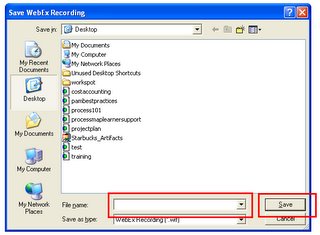
Type AFile Name and click SAVE
The WebEx Recorder Window will appear. You are now ready to record your screen and audio.

4. Click on the Record Button to Start Recording.
Your desktop along with the audio [if you have a microphone connected] will get recorded.
Do a trial recording before you do your first recording session. Click on the PAUSE button to puase.
These pain points can be addressed to some extent by using the offline desktop recorder provided by WebEx. It can be downloaded from the WebEx site. A search for 'WebEx recorder" should also take you to the download page. I use this often at school when there is a need to follow step by step procedures in a corportate finance or decision models class. The audio quality is average. The files for a two hour recording may be about 30 MB and can be streamed from a web site is necessary. If you are wondering how to fill up your 60GB hardrive, this is a good way to do that.
You may need an external mike if your laptop does not have an inbuilt microphone. You can get a good mike for less then $40. Writing notes is more efficient. However having the webex recording as a backup is very reassuring.

There were requests about the procedure to use the Offline WebEx Recorder. So I have added the procedure to record here.
1. Click here to download the WebEx Recorder.
2. Once you download the WebEx Recorder, install it like any other application.
Recording a Session
Look at the sequence of images for reference.
1. Launch the WebEx Recorder by doubleclicking on the Recorder Icon on the desktop.
The WebEx Player Window will appear.
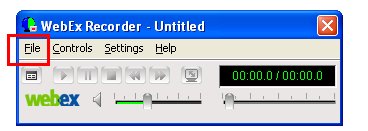
2. Choose FILE + OPEN APPLICATION.
The Open Application Window will appear.

3. Choose WINDOWS DESKTOP and click SELECT
The File Chooser window will appear.
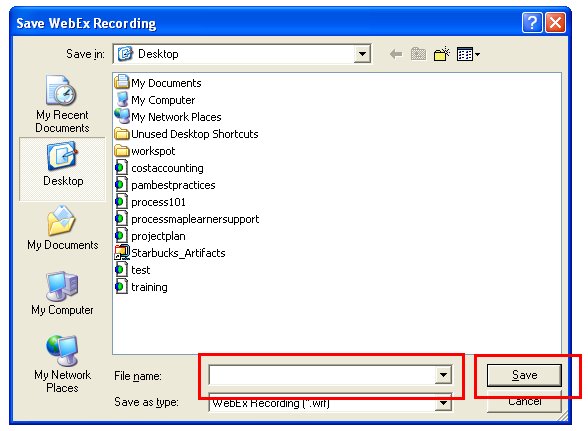
Type AFile Name and click SAVE
The WebEx Recorder Window will appear. You are now ready to record your screen and audio.
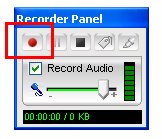
4. Click on the Record Button to Start Recording.
Your desktop along with the audio [if you have a microphone connected] will get recorded.
Do a trial recording before you do your first recording session. Click on the PAUSE button to puase.
Saturday, November 26, 2005
Online Meeting Tools
The cost of online meeting tools has come down significantly since 2000. GoToMeeting.com and several other meeting services are competing with WebEx and LiveMeeting. WebEx's new service http://www.meetmenow.com/ looks like an interesting new product which is priced at $49 per month. This kind of pricing makes it affordable for student groups distributed across cities. My MBA class struggled a lot with this until a classmate from Microsoft offered to provide LiveMeeting for some review sessions. The marketing managers of WebEx and LiveMeeting could target all business schools with MBA programs for working professionals. It is a good market.
One of the new features is integrated VOIP calling in these services. The significance of this feature is that it enables you to record the meeting along with the voice without any external adaptors. In other words you just hit the record button and the desktop along with the voice is recorded.
I use a DELL laptop with a built in microphone to record ambient sounds into WebEx meetings. It works out very well. Most of my colleagues use it to record training workshops and important presentations. We instantly turn the recordings into very compelling training resources.
The online meetings area is becoming a commodity and I believe it is a matter of time before we see such products integrated into regular office software.
In December 2005, Live Meeting from Microsoft came up with a service for $20 a month.
One of the new features is integrated VOIP calling in these services. The significance of this feature is that it enables you to record the meeting along with the voice without any external adaptors. In other words you just hit the record button and the desktop along with the voice is recorded.
I use a DELL laptop with a built in microphone to record ambient sounds into WebEx meetings. It works out very well. Most of my colleagues use it to record training workshops and important presentations. We instantly turn the recordings into very compelling training resources.
The online meetings area is becoming a commodity and I believe it is a matter of time before we see such products integrated into regular office software.
In December 2005, Live Meeting from Microsoft came up with a service for $20 a month.
Subscribe to:
Posts (Atom)
